

![[ECE 5725] AI-Powered Digital Synthesizer](/images/posts/ai-synth-cornell/synth.png)
[ECE 5725] AI-Powered Digital Synthesizer

AI-Powered Digital Synthesizer
AI for Sound Design on Raspberry Pi
Table of Contents
- Objective
- Introduction
- Detailed Goals
- Design & Implementation
- Code Structure
- Modules
- Testing
- Results
- Conclusion
- Future Work
- Team Contributions
- Parts List
- References
- Code Appendix
Objective
In this Project, we aim to design a real-time digital synthesizer with an AI Agent embedded using an Raspberry pi 4. The digital synthesizer can generate sound with envelope, filter, and reverb effects, just like a real keyboard. The AI Agent can communicate with the user through voice, and generate the sound preset the user specifies. For more convenienct manipulation, a PiTFT display, GPIO buttons, and a potentiometer knob with an ADC are connected to the Raspberry pi, giving users an intuitive and easy-to-start with experience.
Introduction
AI-Powered Digital Synthesizer on Raspberry Pi 4 lets users design sound in a way that they have never experienced before. Users can choose either to tune the parameters using parameter selection buttons themselves, or enter AI mode to have a conversation with our AI Agent and ask it to generate the sound.
For software, it is a Python-based real-time sound synthesizer with a built-in LLM Agent. The digital synthesizer supports three channels of waves: saw, sine, and square. Each channel has an envelope, a filter, and a reverb with 15 tunable parameters in total. PiTFT is supported for displaying and selecting parameters and displaying waveform style, envelope curve, and filter percentages. Under AI mode, particle system display as an AI assistant is supported. In the meantime, real-time playback recording is supported by tracking system sound frames.
As for hardware, we included 6 GPIO-connected buttons, an ADS1115 ADC, and a P160 Panel Potentiometer. The GPIO buttons function include: 1 for sound play key, 1 for channel selection, 2 for parameter selection, 1 for AI mode entering/exiting, and 1 for playback control. The potentiometer knob is connected to ADS1115 and then to the Pi4, using the Adafruit_Blinka Python library we can read voltage from the knob in real time.
Fig1. Our AI Powered Digital Synthesizer
Detailed Goals
The Digital Synthesizer
Wave generator: Generates basic waveforms including saw, sine and square. This forms the core sound generation engine of the synthesizer.Envelope: Controls how a sound evolves over time using ADSR (Attack, Decay, Sustain, Release) parameters. This shapes the loudness and character of each note, making it expressive and dynamic.Filter: Processes the waveform to emphasize or attenuate certain frequency ranges. Typical filters include low-pass, high-pass, band-pass, and notch.Reverb: Simulates the effect of sound reflecting in a physical space. This adds depth and spatiality to the sound, making it feel more natural or ambient.Multi-Channel: Supports multiple simultaneous voices or instruments. This allows for polyphony (playing multiple notes at once) and layering of different sounds or effects on different channels.Playback: Includes functionality for recording, storing, and playing back sequences or performances. Useful for composing loops or playing backing tracks.Real-time Processing: ADSR Envelope is in a real-time manner, making the key-press the same as a real digital keyboard. Filter is also real-time, and tuning the filter while playing is possible, just like a DJ set.
The AI Sound Generator
Voice to text (VTT): Captures and transcribes user voice commands using tools like Vosk and Whisper. It acts as the front-end for hands-free control.LLM Agent: Connects the text to a powerful large language model (e.g., gpt-4o) via an API, with carefully designed prompts. This module interprets natural language commands and translates them into synthesizer control actions.Text to Voice (TTV): Converts AI-generated messages to speech and plays them to the user, making the AI system conversation-like.
The PiTFT Displayer
Parameter display: Displays channels, waveform name, envelope, filter, and reverb parameters in a matrix format.Waveform display: Displays the corresponding waveform shape when a certain waveform is selected.ADSR envelope display: Displays a 4-stage curve line, with curve height dynamically related to ADSR values.AI Sphere: Displays a dynamic circle with particles similar to Apple Siri, changing shapes under listening/speaking.
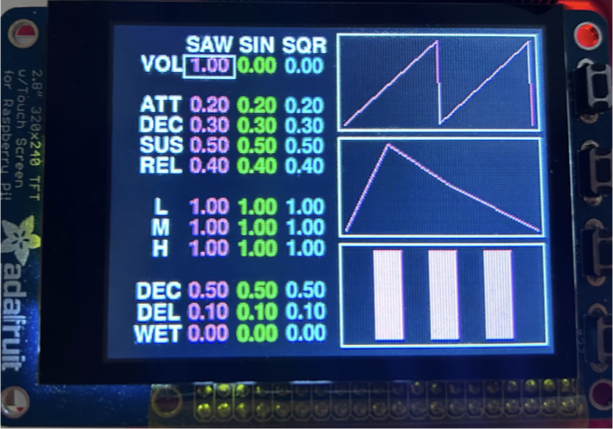
Fig2. The PiTFT Screen Display with parameter and waveform, ADSR, and Filter graphics
Design & Implementation
- Software System Flow
Our software system promarily consists of two parts, the main loop, and an AI loop. The main loop is the main control flow in where sound and display are generated, and where all GPIO callbacks are handled. The AI loop is an system event that can be triggered using one of the GPIO callbacks.
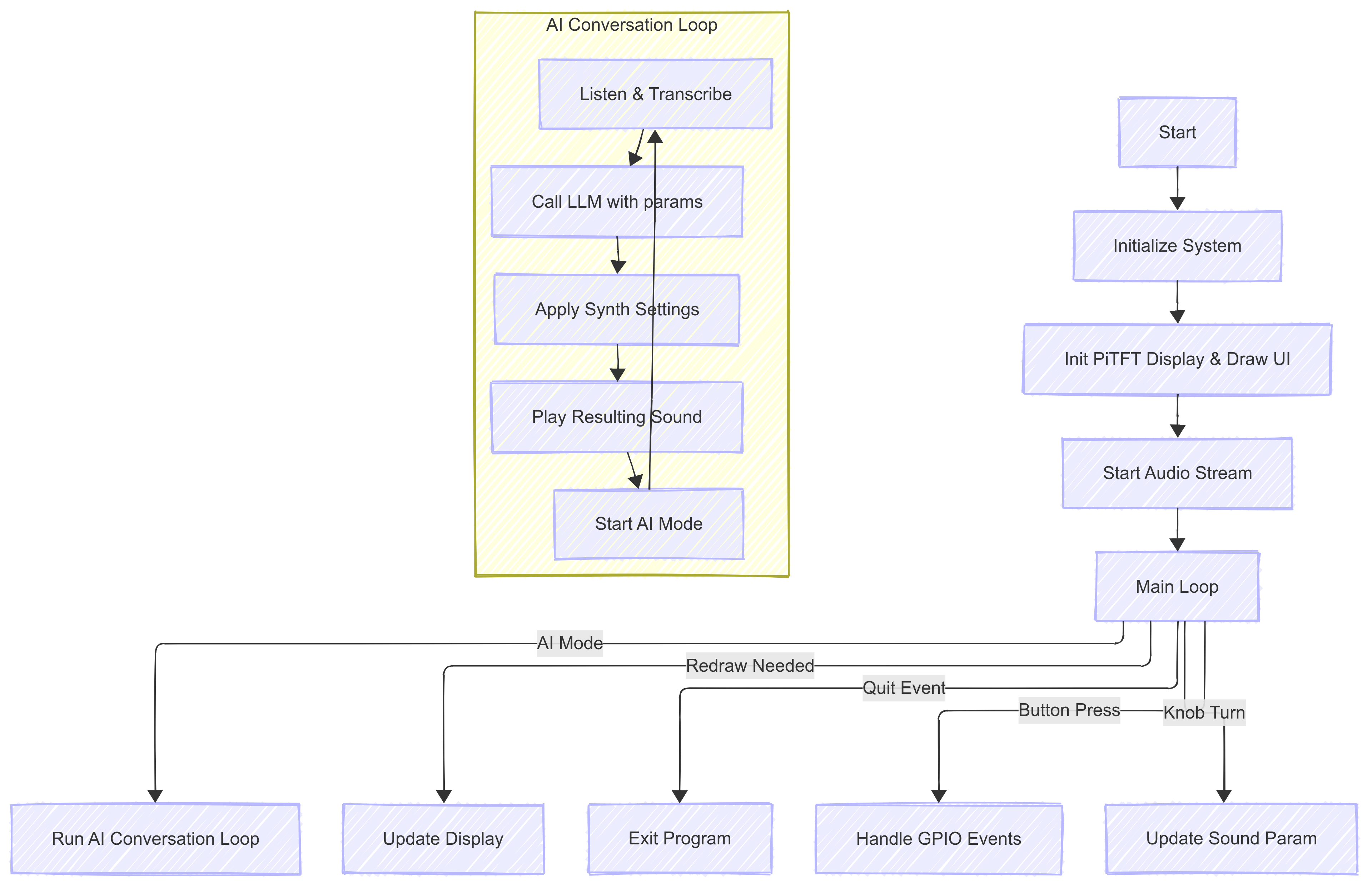
Fig3. The Software System Flow Chart
Key Technical Details
Real‑time sound triggering:
Hardware events on GPIO‑17 (note key) are connected directly to the synthesis engine. It controls thenote_on()andnote_off()of the sound’s envelopes to turn on and off the noise.1
2
3
4
5
6
7
8
9
10
11
12
13
14
15
16
17
18
19
20
21
22
23
24
25
26
27
28
29
30
31
32
33
34
35
36
37
38
39
40
41
42
43# main.py –– hardware interrupt
def GPIO17_callback(channel):
if GPIO.input(17) == GPIO.LOW: # key pressed
sound.note_on() # start envelope
else: # key released
sound.note_off() # release envelope
GPIO.add_event_detect(17, GPIO.BOTH,
callback=GPIO17_callback,
bouncetime=5)
```
The **audio thread** is opened during the entire main loop and remains hot for the lifetime of the program:
```python
with sd.OutputStream(samplerate=SAMPLE_RATE,
channels=1,
dtype="float32",
callback=audio_callback):
run_main_loop() # GUI, GPIO, AI, etc.
```
During every audio block the callback mixes the current sample block produced by our sound engine:
```python
# main.py –– audio callback
def audio_callback(outdata, frames, time_info, status):
sig = sound.process(frames) # ← pulls from every channel
outdata[:, 0] = np.clip(sig, -1.0, 1.0)
```
`sound.process()` iterates over all active **Channel** objects and, for each, calls its envelope‐aware `process()` to obtain a band‑limited waveform whose amplitude is shaped by ADSR. Because the GPIO ISR switches the envelope’s state variables immediately, the very next audio block reflects the new amplitude curve, giving sub‑millisecond “feel”:
```python
# channel.py –– Channel.process()
def process(self, frames):
ar = np.arange(frames)
idx = (self.phase + ar) % self.waveform.length
sig = self.waveform.data[idx].copy()
for env in self.envelopes:
sig *= env.process(frames) # Apply ADSR envelope
for fl in self.filters:
sig = fl.apply(sig) # Apply filters
for rv in self.reverbs:
sig = rv.apply(sig) # Apply reverbs
sig *= self.volume
self.phase = (self.phase + frames) % self.waveform.length
return sigReal-time Enveloping:
Implemented in channel.py’sEnvelopeclass. Each voice’s ADSR envelope parameters are stored and updated per-sample inprocess().1
2
3
4
5
6
7
8
9
10
11
12
13
14
15
16
17
18
19
20
21
22
23
24
25
26
27
28
29
30
31
32
33
34
35
36
37
38
39
40
41
42
43
44
45
46
47
48
49
50
51
52
53
54
55
56
57
58
59
60
61
62
63
64
65
66
67
68
69
70
71
72
73
74
75
76
77
78
79
80
81
82
83
84
85
86
87
88
89
90
91
92
93
94
95
96
97
98
99
100
101
102
103
104
105
106
107
108
109
110
111
112
113
114
115
116
117
118
119
120
121
122
123
124
125
126
127
128
129
130
131
132
133
134
135
136
137
138
139
140
141
142
143
144
145
146
147
148
149
150
151
152
153
154
155
156
157
158
159
160
161
162
163
164
165
166
167
168
169
170# channel.py –– Envelope.process()
def process(self, frames):
env = np.zeros(frames, dtype='float32')
if self.state == 'idle':
return env
self.update_samples() # ADSR values are updated here according to knob tuning
for i in range(frames):
if self.state == 'attack': # As an example of how ADSR progress is recorded
self.progress += 1.0 / self.a_samps
self.current_amp = min(self.progress, 1.0)
env[i] = self.current_amp
if self.progress >= 1.0:
self.state = 'decay'
self.progress = 0.0
elif self.state == 'decay':
# ...
elif self.state == 'sustain':
# ...
elif self.state == 'release':
# ...
else:
env[i] = 0.0
return env
```
The per-sample state machine yields smooth, glitch-free amplitude modulation.
- **Real-time Filtering**:
Implemented a simple frequency modulation filter in **channel.py**’s `Filter` class:
```python
# channel.py
class Filter:
def __init__(self):
# ...
def apply(self, signal):
"""Apply band-specific gains."""
fft = np.fft.rfft(signal)
freqs = np.fft.rfftfreq(len(signal), d=1/self.sr)
fft[freqs < 400] *= self.low
fft[(freqs >= 400) & (freqs < 4000)] *= self.mid
fft[freqs >= 4000] *= self.high
return np.fft.irfft(fft, n=len(signal))
```
`numpy` provides CPU-fast array processing, making te filter of a frame within milliseconds.
- **AI thread event control with GPIO**:
GPIO26 is reserved to abort the AI sequence and return to the main loop immediately:
```python
# main.py
ai_abort = threading.Event()
def GPIO26_callback(_):
ai_abort.set() # signal AI thread
# in AI thread:
if ai_abort.is_set():
ai_abort.clear()
return_to_main_loop()
```
This design provides a hard “panic” to exit long LLM calls or speech synthesis without waiting, improving UX and safety in live performance.
- **AI Mode state machine control**:
The AI interaction is managed by a finite-state machine in **reaction.py**:
```plaintext
IDLE -> LISTENING -> THINKING -> SPEAKING -> IDLE
```
Each transition has entry/exit hooks and timeouts. This ensures robust handling of partial speech, API delays, and guarantees return to **IDLE** even on errors.
- **AI-Sphere effect**:
In **view.py**, we add dynamic effects when AI is listening/thinking/speaking, just like the `Apple Siri`.
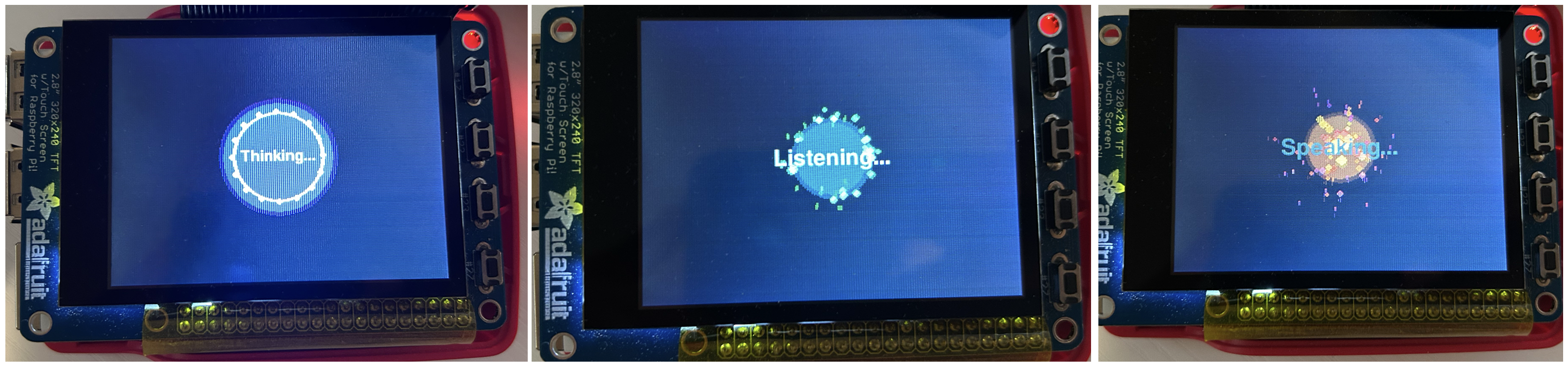
<div align="center">
<p style="margin-top:10px; font-size:16px;">Fig4. AI-Sphere under AI-Mode</p>
</div>
A `ParticleSystem` and a `Blooming Ball` are designed together to form the vivid `AI Sphere` that adds fun the the AI generating process.
- **LLM prompting and structured output**:
To make sure that LLM outputs the exact need parameters without any other stuffs, the `System Prompt` embed a strict JSON schema:
```python
SYSTEM_PROMPT = """You are a professional synthesizer sound designer assistant.
Your job is: based on a user's natural language description of the desired sound characteristics (such as tone, feeling, attack speed, reverb strength, etc.), infer appropriate synthesizer parameters, and generate a full JSON configuration, as follows:
- Output an overall "description" field (a short 1-2 sentence natural language description summarizing the intended sound character based on the user's input).
- Then output a "channels" field, which is a list of 3 sound channels, each configured as below:
- The first channel must always use waveform "saw"
- The second channel must always use waveform "sin"
- The third channel must always use waveform "sqr"
Each channel must contain:
- waveform (name fixed + frequency matching the description if specified)
- envelope (attack_time, decay_time, sustain_level, release_time)
- filter (low, mid, high gain settings)
- reverb (decay, delay, wet)
- volume
The range of each parameter is as follows:
- attack_time: 0.0 to 1.0
- decay_time: 0.0 to 1.0
- sustain_level: 0.0 to 1.0
- release_time: 0.0 to 1.0
- low: 0.0 to 1.0
- mid: 0.0 to 1.0
- high: 0.0 to 1.0
- decay: 0.0 to 1.0
- delay: 0.0 to 0.2
- wet: 0.0 to 1.0
- volume: 0.0 to 1.0
If the user specifies tone (e.g., "punchy", "smooth", "ambient"), modify attack, decay, reverb, and volume accordingly to match the feel.
If the user specifies a frequency, apply it uniformly across all channels unless otherwise indicated.
If the user implies to that the parameter is right and want exit, set exit to 1, oherwise set it to 0.
Notice:
- The input of user is retrieved from a microphone, so the text may be inaccurate. Please notice this and try get the user's meaning as much as you can.
- You are able to set different parameters for saw, sin and sqr waveforms. Just do your best to make the sound as close to the user's description as possible.
Example structure:
{
"exit": 0,
"description": "A punchy and ambient preset with fast attack and rich reverb, suitable for energetic leads.",
"channels": [
{
"waveform": {
"name": "saw",
"frequency": 440.0
},
"envelope": {
"attack_time": 0.1,
"decay_time": 0.3,
"sustain_level": 0.7,
"release_time": 0.4
},
"filter": {
"low": 1.0,
"mid": 0.8,
"high": 1.2
},
"reverb": {
"decay": 0.5,
"delay": 0.1,
"wet": 0.3
},
"volume": 0.8
},
...
]
}
Only output valid JSON.
"""
```
The returned text is parsed via `resp = json.loads(raw)` and validated before calling `Sound.note_on()`.
- **TTV and VTT**:
(“TTV” = Text-to-Voice and “VTT” = Voice-to-Text)
Two ASR/TTS pipelines:
- **VTT**: `SpeechToTextLocal` (Vosk) & `SpeechToTextWhisper` (OpenAI) selectable.
- **TTV**: `TextToSpeech` use system `espeak` to minimize latency.
```python
subprocess.call(
[
'espeak',
f'-s{self.rate}', # set speaking rate
f'-a{self.volume}', # set volume amplitude
text
],
stdout=subprocess.DEVNULL,
stderr=subprocess.DEVNULL
)Support for streaming output reduces end-to-end latency.
Circuit design:
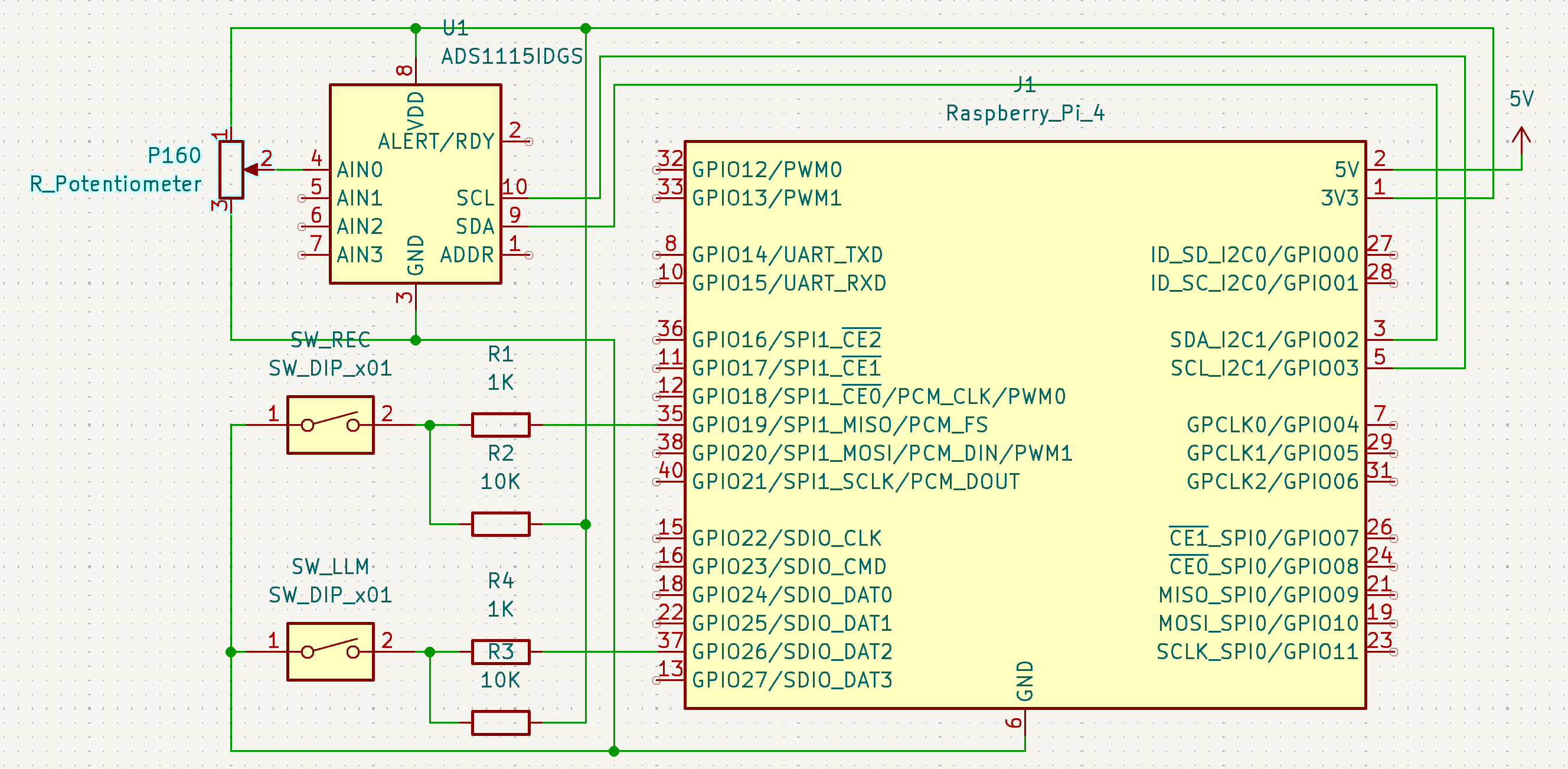
We use an ADS1115 ADC on I²C plus two tactile switches (SW_RECon GPIO 19,SW_LLMon GPIO 26) wired with pull-up and series resistors for reliable edge detection:
Fig5. Hardware Circuit Schematic Diagram
Switch Debounce & Safety:
The 10 kΩ pull-ups keep the lines high; the 1 kΩ series resistors limit fault currents if the pin is accidentally reconfigured as output.Potentiometer on ADS1115:
A 10 kΩ P160 potentiometer is wired as a voltage divider between 3.3 V and GND, with the wiper tied to ADS1115.AIN0:1
2
33.3 V ── P160 ── GND
│
└──> ADS1115 AIN0 (16-bit, up to 860 SPS)The ADS1115 returns a 0–65 535 count, which we scale to 0.0–1.0 and quantize to discrete parameter steps in
knob.py.
Analog voltage input quantization:
The input voltage is quantized 1%, meaning that in the main function, whenever the knob is tuned and the difference is over 1%, the knob callback function is triggered to change the sound parameters. This makes the knob change real-time and also reduce CPU consumption as well.Adding a knobbing detection interval:
Because ADS1115 doesn’t support GPIO callback function, the knobbing can only be polled in the main loop. To reduce system usage, we include a knobbing detection timestep to reduce the sampling rate. We set the interval to 0.1 seconds, and the voltage detection would only happen every 0.1 seconds:1
2
3
4
5
6
7
8
9
10
11
12
13
14
15
16with sd.OutputStream(samplerate=SAMPLE_RATE, channels=1, dtype='float32', callback=audio_callback):
try:
while running:
# ...
if now - knob_in0.last_time > knob_in0.poll_interval:
knob_in0.last_time = now
new_voltage = knob_in0.channel.voltage
if abs(new_voltage - knob_in0.last_voltage) > knob_in0.threshold:
knob_in0.last_voltage = new_voltage
on_knob_in0_voltage_change(new_voltage)
# ...
clock.tick(30)
except KeyboardInterrupt:
pass
finally:
del pitftPlayback state machine and buffering:
Live audio recording and playback are controlled via a simple three-state system toggled by GPIO‑19:- State 0: Idle – wait for user input
- State 1: Recording – store output buffers in
record_frames - State 2: Playback – stream from
playback_buffer
The logic is triggered via a GPIO interrupt:
1
2
3
4
5
6
7
8def GPIO19_callback(channel):
if record_state == 0:
record_frames = []; record_state = 1
elif record_state == 1:
playback_buffer = np.concatenate(record_frames).flatten()
playback_pos = 0; record_state = 2
elif record_state == 2:
record_state = 3 # Start playbackIn
audio_callback, it conditionally records or plays back:1
2
3
4
5if record_state == 1:
record_frames.append(outdata[:, 0].copy())
elif record_state == 3:
outdata[:, 0] = playback_buffer[playback_pos:playback_pos+frames]
playback_pos += framesThis block-aligned, buffer-based approach allows seamless one-button looping with no latency issues, ideal for live capture and replay.
Adaptive display module:
In view.py we defines sub-draw functions:1
2
3
4
5
6
7
8
9
10
11
12
13
14
15
16
17
18
19
20
21
22
23
24
25
26
27
28
29
30
31
32
33
34
35
36
37
38
39
40
41
42
43
44
45
46
47
48
49
50
51
52
53
54
55
56
57
58
59
60
61
62
63
64
65
66
67
68
69
70
71
72
73
74
75
76
77
78
79
80
81
82
83
84
85
86
87
88
89
90
91
92
93
94
95
96
97
98
99
100
101
102
103
104
105
106
107
108
109
110
111
112
113
114rects = _compute_panel_regions(screen.get_size())
draw_waveform_preview(screen, rects['waveform'])
draw_envelope_preview(screen, rects['envelope'])
draw_filter_preview(screen, rects['filter'])
draw_AI_interface(screen, rects['ai'])
```
`draw_screen()` bundles these calls in sequence, and **main.py** simply calls `view.draw_screen()` each frame.
In addition, instead of a fixed FPS, we use a “dirty” flag to only update the PiTFT display when something changes:
```python
dirty = True
while running:
handle_events(lambda: dirty=True)
if dirty:
view.draw_screen()
pygame.display.update()
dirty = False
clock.tick(30)
```
Which brings the befinit of reducing CPU/GPU usage and audio glitches by avoiding unnecessary redraws.
3. **Challenges & Trade‑offs**
- **VTT Latency vs. Cost – Vosk vs. Whisper**
Local `Vosk` runs entirely on‑device, adding ~10 s processing delay and is less accurate on noisy input on Pi4. `OpenAI Whisper API` offers near‑human transcription quality, yet round‑trip latency only 400–600 ms but incurs per‑minute usage fees. The project defaults to Vosk for low‑price play.
- **Knob Accuracy vs. CPU Overhead**
Reading the `ADS1115` per while loop yields 16‑bit precision but consumes more CPU. Dropping to 0.1s per read reduces CPU use yet reduces effective resolution of knobing. However, the knobbing does not require really-high resolution since this is not a professional DJ set, and 0.1s performs well without user noticing significant delay.
- **LLM Response Quality/Latency vs. API Expense**
There are several OpenAI Models to choose from, including `gpt-4o`, `gpt-4o-mini`, `gpt-o1`, `gpt-o3`. Among them, `gpt-4o-mini` is the cheapest. However, it sould sometimes generate inconsistent result and may not follow the json schema. Since our prompt and input is really limited, and with our testing, `gpt-4o-mini` is a good and stable choice.
---
## Code Structure
```bash
synth/
├── main.py
│ ├── ai_conversation_loop()
│ ├── GPIO19_callback()
│ ├── GPIO26_callback()
│ ├── GPIO17_callback()
│ ├── GPIO22_callback()
│ ├── GPIO23_callback()
│ ├── GPIO27_callback()
│ ├── set_quantized()
│ ├── on_knob_in0_voltage_change()
│ └── audio_callback()
│
├── channel.py
│ ├── Channel
│ │ ├── __init__()
│ │ └── process()
│ ├── Waveform
│ │ └── __init__()
│ ├── Envelope
│ │ ├── __init__()
│ │ ├── update_samples()
│ │ ├── note_on()
│ │ ├── note_off()
│ │ └── process()
│ ├── Filter
│ │ ├── __init__()
│ │ └── apply()
│ └── Reverb
│ ├── __init__()
│ └── apply()
│
├── sound.py
│ └── Sound
│ ├── __init__()
│ ├── add_channel()
│ ├── process()
│ ├── note_on()
│ ├── note_off()
│ └── get_current_params()
│
├── view.py
│ ├── Particle
│ │ ├── __init__()
│ │ ├── update()
│ │ └── draw()
│ ├── get_param_text_center()
│ ├── draw_param()
│ ├── draw_param_ring()
│ ├── draw_params()
│ ├── draw_texts()
│ ├── draw_box()
│ ├── _compute_panel_regions()
│ ├── draw_waveform_preview()
│ ├── draw_envelope_preview()
│ ├── draw_filter_preview()
│ ├── draw_screen()
│ └── draw_AI_interface()
│
├── knob.py
│ └── KnobInput
│ ├── __init__()
│ └── read_knob()
│
└── reaction.py
├── call_synth_llm()
├── LLMClient
│ ├── __init__()
│ └── gen_resp()
├── SpeechToTextLocal
│ ├── __init__()
│ └── record_and_transcribe()
├── SpeechToTextWhisper
│ ├── __init__()
│ └── record_and_transcribe()
└── TextToSpeech
├── __init__()
└── speak()
Modules
main.py
- Program entry & event loop: sets up audio stream and dispatches GPIO/AI/UI events.
- ai_conversation_loop(): manages the AI listen–think–speak cycle.
- GPIO callbacks (
GPIO19_callback(),GPIO26_callback(),GPIO17_callback(),GPIO22_callback(),GPIO23_callback(),GPIO27_callback()): handle record/playback, AI-abort, note triggers, mode switches. - set_quantized() & on_knob_in0_voltage_change(): convert ADC readings into discrete synth parameters.
- audio_callback(): invoked by
sd.OutputStream; pulls per-block samples viasound.process()and writes them to the DAC.
channel.py
- Channel: encapsulates one synth voice;
__init__()sets up oscillator, envelope, filter, reverb;process()generates one block of audio. - Waveform: base class for oscillator tables/waveforms.
- Envelope: ADSR generator (
__init__(),update_samples(),note_on(),note_off(),process()), shaping amplitude sample-by-sample. - Filter: Frequency modulation filter (
__init__(),apply()), applied to each voice. - Reverb: feedback-delay-network reverb (
__init__(),apply()), adds spatial ambience.
sound.py
- Sound: top-level audio engine container.
__init__(): initializes buffer, channel list.add_channel(): registers a newChannel.process(): mixes all channels into one float array per block.note_on(),note_off(): broadcast triggers to each channel’s envelope.get_current_params(): query realtime synth/FX settings for UI.
view.py
- Particle: visual “thinking” effect with
__init__(),update(),draw(). - Layout & drawing utilities:
get_param_text_center(),draw_param(),draw_param_ring(),draw_params(),draw_texts(),draw_box(),_compute_panel_regions().- Preview renderers:
draw_waveform_preview(),draw_envelope_preview(),draw_filter_preview(). - draw_AI_interface(): overlays UI during AI processing.
- draw_screen(): composes all sub-draw calls each frame.
knob.py
- KnobInput: reads a potentiometer via SPI/ADC;
__init__(): configures ADS1115 settings.read_knob(): samples, and quantizes into discrete control values.
reaction.py
- call_synth_llm(): formats user prompt and queries LLM for synth commands.
- LLMClient: wrapper for API (
__init__(),gen_resp()). - SpeechToTextLocal & SpeechToTextWhisper (
__init__(),record_and_transcribe()): two ASR backends. - TextToSpeech: synthesizes LLM responses into audio (
__init__(),speak()).
Testing
Software Testing
Our system is integrated by
channel.py,sound.py,view.py,knob.py, andreaction.py. We developed these modules seperately, and tested them independently. In project folder./testdemos, you shall see anLLM_actionfolder, which contains files used to test the LLM module. Intest_key.pyandsaw_test.py, the GPIO input with sound generation was tested. We developed our system in a progressive, with several checkpoints saved using git, each of which has been tested by running the entire program and see if there are any unfixed problems, which we will solve in the later version.Hardware Testing
Our hardware consists of a knob, an ADC1115, and several buttons with resistors and wires. To test the knob’s functionality, we used the voltmeter provided by the lab to measure the minimum and maximum values of our desired output. We ensured that the value range changes little in independent knobbing tests. After that, we connect the ADC1115 to the Pi and read its voltage signal using the script
test_ADS1115.py. We observed a fast and stable voltage input, and only after that did we continue integrating the ADC module into our main program. For the buttons, we test it using simpleprint()function, and tuned the bouncetime to make minimum trigger faults.
Results
In this project, we successfully implemented an AI-powered digital synthesizer that works smoothly. We did everything as planned, even beyond that. As planned, we successfully designed the software of real-time sound generation, envelope/filter/reverb effects, and playback. We built the fancy PiTFT display with dynamic ADSR graphics. We successfully built the hardware including the knob and the ADC, providing stable and low-latency real-time parameter tuning, which is astonishing. We also successfully included VTT, TTV, and LLM-API integration that works together smoothly as a vocal-chatbot. We successfully prompt the LLM to generate accurate parameters in
.jsonformat.
Beyond our plan, we built a vivid AI-Sphere that dynamically changes when the AI listens/speaks/thinks, making the AI-sound generation process more interesting. Additionally, we performed several performance optimization techniques. First, we use an interval of 0.1s for ADC voltage sampling, successfully mitigated the overhead of polling due to unavailability of hardware interrupt. Second, we used a
dirtyflag to enable adaptive screen updating, letting the program draw UI only when parameters are updated and display needs to be changed. Third, we combine thedirtyflag with our real-time sound generation for an interruptive sound play under AI mode. Because Pi4 cannot process dynamic AI-Sphere update together with sound play, we suspend the AI-Sphere drawing using dirty flag when sample sound is played after the configs are generated. In this way, users can hear the sound as soon as the AI generates it, giving immediate feedback. Last but not least, we support consecutive conversation under AI-mode. Users can ask questions and tune parameters endlessly with the LLM, and exit the AI-mode using voice control. The above optimizations together provide a smooth and astonishing experience of AI sound design under a Raspberry Pi 4.
Conclusion
This project demonstrates a fully integrated, low-latency software synthesizer with AI-driven control, real-time audio DSP, and an intuitive single-knob UI. We achieved sub ~ms trigger response, glitch-free envelopes and filters, and a stable reverb—all running on a Raspberry Pi 4 in parallel with on-device and cloud AI services. Key lessons include the importance of lean ISR logic, block-aligned parameter swaps to avoid audio artifacts, and “dirty-rect” display updates to preserve CPU headroom for sound. Future improvements could add multi-voice polyphony, melody generation, customizable convolution reverbs, a richer patch-management interface, and deeper integration of on-device neural networks for offline AI performance.
Future Work
Low-Latency AI Response. Currently, a request to AI would go through
VTT -> LLM API -> Cloud -> LLM Response -> TTV, among which theVTTconsumes around 5~10 seconds of time running on a local machine. It also takes ~5 seconds to run it on the cloud. We can equip our Pi with an accelerator to run theVTTmodel and reduce latency.DAW and MIDI Support. Our sound generation works well, but lacks interoperability. Our synthesizer is a stand-alone project that cannot connect with DJ setups, DAW(Digital Audio Workstation)s, and does not support MIDI input/output. We can add those to fit our design with the industrial standard.
Melody generation. Music is about sound and melodies, it would be boring to be able to generate just one tone. We can use LLM for time sequence generation and melody generation. Together with our sound generation, the Pi can play any song the user wants.
Team Contributions
Zuoming Fu
Main Developer
Software system integration, hardware design,
AI system integration, audio system,
viewing and knobbing modules design.
Muyang Li
AI Engineer
AI system modules, LLM API,
VTT and TTV modules,
testing and optimization.
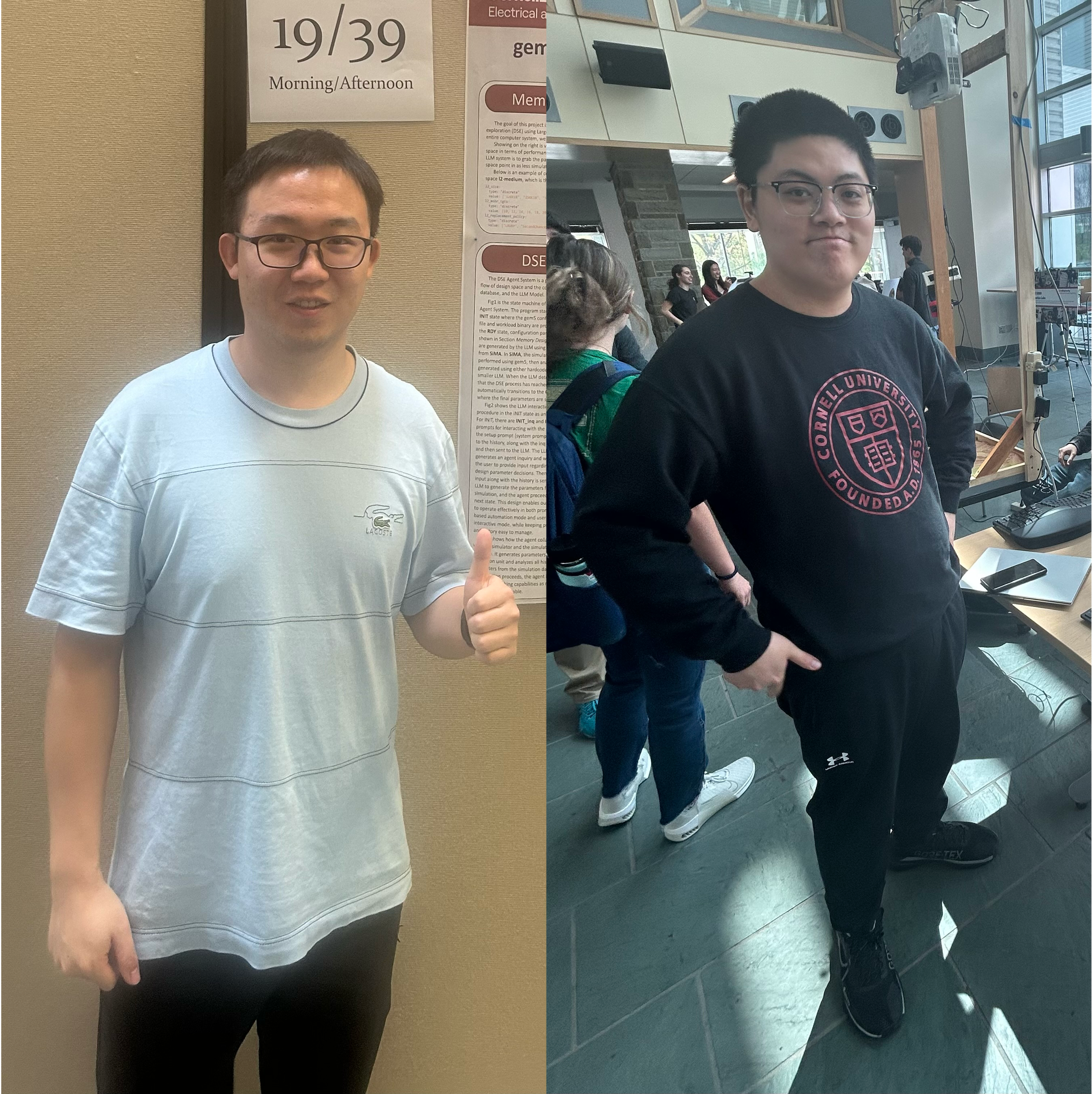
Fig6. Meet Our Team - Zuoming Fu (Left) Muyang Li (Right)
Parts List
- Raspberry Pi 4: $35.00
- ADS1115: $14.95
- USB Microphone: $5.95
- P160 potentiometer: $2.29
- gpt-4o-mini: $0.15(input); $0.075(cacheinput); $0.60(output) per 1M tokens
- Total: ~$58.2